If you’ve been building on Azure for a few years, your data stack has probably grown in several ways. You might have added Data Factory for pipelines, brought in Synapse for analytics, Databricks somewhere in the mix for ML work, and Power BI on top for reporting and dashboards. Each one made sense when you added it. But now you’re managing all of them separately, paying for all of them, and spending more time than you’d like just trying to get them to work together cleanly. This kind of environment is genuinely hard to operate on a large scale.
Microsoft Fabric is the answer to that problem. It became generally available in November 2023, and the thinking behind it was straightforward — stop making data teams stitch together a platform from a bunch of disconnected services and give them something that already functions as one cohesive system. Data Factory, Synapse, and Power BI all fold into Fabric, with OneLake sitting underneath everything as a shared storage layer, so your data isn’t scattered across different storage accounts and workspaces anymore. Everything the platform needs can reach the same data without extra movement or duplication.
Power BI Premium per Capacity was retired in January 2025, which means organizations still on those licenses are already facing the migration question. But even setting that aside, the broader shift toward AI-driven analytics makes a strong case on its own. Fabric has Azure OpenAI integrated across the platform, so engineers can build pipelines, write transformation logic, and work on models using natural language in ways that simply aren’t possible when your tools are siloed and disconnected from each other.
Why Enterprises are Migrating to Microsoft Fabric
Data Complexity
Without a unified monitoring layer, tracking data lineage, pipeline health, and performance across all these tools becomes genuinely painful. Engineering teams end up spending most of their time keeping infrastructure alive rather than building things that move the business forward.
Rising Costs
The pay-as-you-go model that felt flexible at the start looks a lot less friendly when you’re running parallel computer environments and duplicating storage across services. As data volumes grow, so do the costs of managing storage, processing, and maintenance across separate environments, and that tends to get worse as you scale, not better.
Learn More – Revolutionizing Data Workflows With ETL/ ELT Tools in Microsoft Fabric
Data silos
When your lakes, warehouses, and BI models are all disconnected, you end up with multiple versions of the same data telling different stories. Building reliable AI on top of that is incredibly difficult because fragmented, inconsistent data produces fragmented, inconsistent results.
Data Governance
Security configuration across these services must be set up and maintained separately for each one. As your data estate grows and regulatory requirements get stricter, managing compliance across a dozen different services with their own security models becomes a real operational problem.
What Microsoft Fabric Offers
Designed for AI-Ready Data Foundations
Most analytics platforms treat AI as something you layer on after your data infrastructure is stable. In Fabric, Azure OpenAI is embedded across every layer of the platform, so developers can build pipelines, generate transformation logic, and create machine learning models through conversational language without switching tools or context. Governed datasets and integrated pipelines mean your data is clean and trusted before it ever reaches a model, which makes a real difference in how quickly teams can operationalize AI rather than just talk about it.
Enterprise Benefits at Scale
The outcomes enterprises typically see after migrating come down to things that matter to leadership. Fewer environments to manage, less data duplication, and more consistent governance because security policies are configured once and applied across the whole platform. Teams across different roles and functions can access, manage, and analyze the same data simultaneously, so the analytics team, the data science team, and the business team are finally working from the same source of truth.
Strategic Business Drivers Behind Azure to Microsoft Fabric Migration
Migrating to Fabric is about reducing the cost and complexity of running a fragmented stack while building a foundation that can support the AI and analytics ambitions most enterprises have on their roadmap. As one data lead at Aon put it, Fabric lets teams spend less time building infrastructure and more time adding value to the business, and that’s probably the clearest way to frame what this shift is about.
Cloud Analytics Modernization with Microsoft Fabric
With Data Engineering and Data Factory working natively together inside Fabric, ingesting data from multiple sources, building real-time and batch pipelines, and delivering insights across the organization all happen within a single environment. Teams aren’t waiting on data to move between systems before they can work with it, and that alone cuts down time-to-insight significantly.
Enabling AI-Driven Intelligence Across Enterprise
Fabric’s real-time intelligence capabilities mean organizations can act on data as it arrives rather than waiting for scheduled batch processes to complete. Embedded ML workflows, AI-powered analytics, and predictive insights all become a lot more accessible when the data feeding them is unified, governed, and sitting on the same platform you’re already working on.
Reducing Operational Overhead and Total Cost of Ownership
Running a multi-service Azure stack means managing separate computer environments, duplicated storage across lakes and warehouses, and governance controls that have to be maintained per service. Consolidating onto Fabric removes most of that overhead. Fewer environments to provision, less redundant data movement, and compliance controls that actually scale with your data estate rather than against it.
Improving Governance, Trust, and Compliance
Security in Fabric is managed once and enforced uniformly across all engines, which means you’re not replicating access policies across every tool in your stack. End-to-end data lineage, unified security policies, and built-in compliance frameworks give leadership teams the visibility and control they need to scale analytics with confidence and meet regulatory requirements without it becoming a full-time job.
Learn More – Microsoft Fabric vs Power BI – What’s the Difference?
A Practical Roadmap for Migrating from Azure Data & AI Stack to Microsoft Fabric
Migrations fail because of poor planning, underestimating complexity, and trying to move too much too fast. Here is how a well-structured Azure to Fabric migration looks in practice.
Phase 1: Assessment and Planning
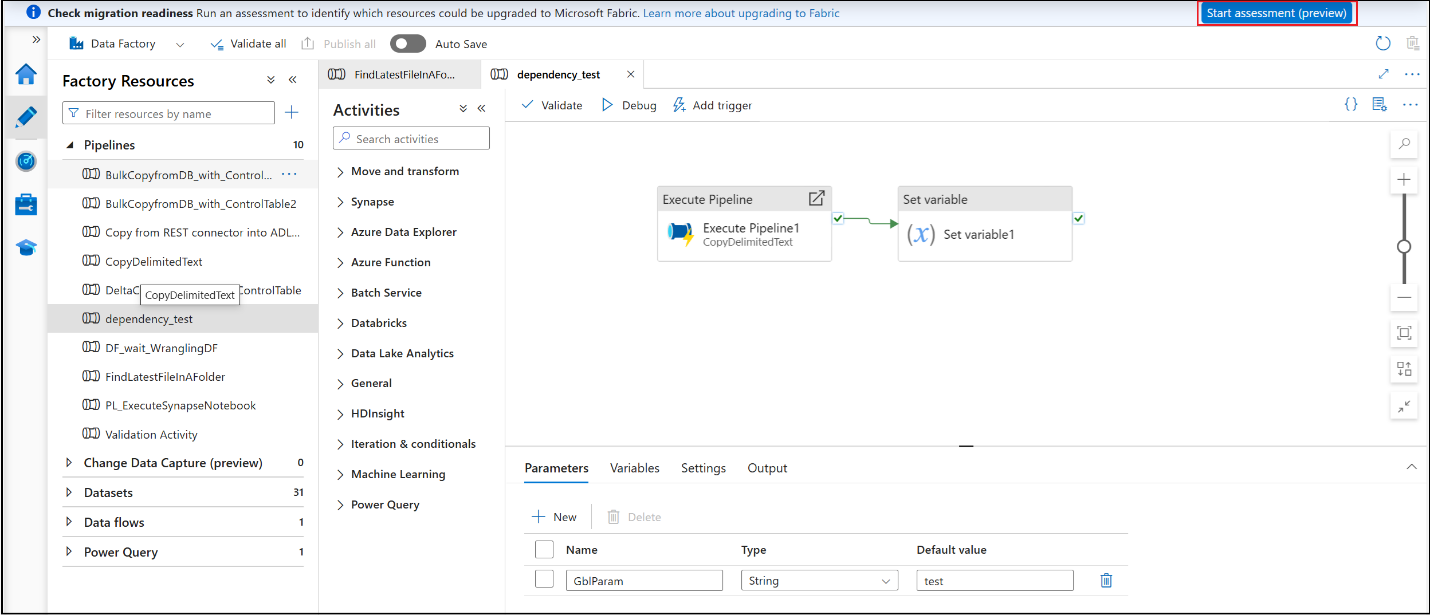
Before anything moves, you need a clear inventory of what you’re working with. Microsoft provides a built-in migration assessment tool inside ADF that helps you identify which pipelines and activities are ready to migrate, which need modifications, and which aren’t yet supported in Fabric. Run first, export the report, and rank your workloads by business impact and complexity. A few things to map out during this phase:
- Which ADF pipelines are straightforward lifts, and which need redesigning
- Global parameters in ADF that need to be converted to Fabric Variable Libraries.
- Synapse dedicated SQL pools, serverless pools, and Spark workloads that need different migration paths.
- Power BI Premium workspaces that need to be moved to Fabric capacities.

Source – Microsoft
Phase 2: Unifying Data Foundations with OneLake
You don’t have to copy everything over on day one. If you’re currently on ADLS Gen2, OneLake shortcuts let you point directly to your existing storage without moving any data— Fabric reads it natively while your existing systems keep running. As you gain confidence, you start rerouting notebooks and Spark job definitions to write directly into OneLake. The goal here is to create a single governed storage layer before you migrate compute workloads on top of it.
Phase 3: Migrating Pipelines and Data Engineering Workloads
This is where most of the technical effort lives. For ADF pipelines, the Microsoft.FabricPipelineUpgrade PowerShell module lets you import ADF pipelines, map linked services to Fabric connections, and upgrade them at scale as it handles Copy, Lookup, and Stored Procedure patterns well. Treat the output as a scaffold, though; complex pipelines still need manual rework. A few things to keep in mind:
- ADF Mapping Data Flows have no direct equivalent in Fabric and need to be rebuilt as Dataflow Gen2 for low-code transformations or Spark notebooks for more complex logic.
- The ADF item mount in Fabric gives you a live view of your existing ADF pipelines inside Fabric without migrating anything, which is useful for running both side by side during transition.
For Synapse dedicated SQL pools, the Fabric Migration Assistant lets you export a DACPAC from your Synapse pool, upload it, and it translates your T-SQL metadata, including tables, views, stored procedures, and functions, to Fabric-compatible syntax. After that:
- Run a copy job connecting to your source Synapse pool, select the tables, map columns, and run a one-time full data copy into Fabric Warehouse
- Update all connection strings pointing to your old Synapse pool using the List Connections REST API and reroute them to the new Fabric Warehouse through Manage Connections and Gateways in Settings
Phase 4: Activating Advanced Analytics and AI
Once core workloads are stable in Fabric, teams can begin using capabilities that were previously unavailable. Real-time intelligence through Eventhouses, Copilot-assisted development across notebooks and pipelines, and predictive analytics on clean, governed data. Synapse Data Explorer workloads migrate to Eventhouse, and existing query and ingestion endpoints stay active for up to 90 days post-migration, giving teams enough runway to update applications without a hard cutover.
Phase 5: Continuous Optimization and Governance
Post-migration isn’t the finish line. The expectation is that you scale resources as workloads shift, build repeatable migration templates based on the experience gained, and continuously identify cost-optimization opportunities as Fabric continues to evolve. Capacity sizing, query performance tuning, and governance reviews are ongoing work, not a checkbox you tick once and move on.
Microsoft Fabric vs Traditional Azure Data & AI Stack
| Area | Traditional Azure Stack | Microsoft Fabric |
| Architecture | Multiple independent services to configure and maintain | Unified SaaS platform where everything works together natively |
| Data Storage | Disconnected lakes and warehouses with duplicated data | OneLake as a single unified storage foundation |
| Analytics & BI | Separate tools that need to be integrated manually | End-to-end analytics built into the platform |
| AI Enablement | Complex custom integrations required to enable AI | Native AI and Copilot capabilities across all workloads |
| Governance | Security and compliance managed per service | Centralized governance is applied once across the entire platform |
| Cost Management | Fragmented spending across multiple service billings | Unified capacity model with optimized consumption |
In a Nutshell
At some point, the complexity of managing a fragmented Azure data stack stops being a technical inconvenience and starts becoming a business problem. Slower insights, unpredictable costs, governance that doesn’t scale, AI initiatives that never quite get off the ground because the data foundation isn’t ready for them. Microsoft Fabric addresses all of that, but getting there requires a migration that’s thought through properly, executed in phases, and matched to how your organization operates.
At Stridely Solutions, we’ve helped enterprises work through this kind of transition. Contact us today for Microsoft Fabric migration, Cloud analytics modernization, or modernizing specific analytics workloads.