
Migrating enterprise data platforms without disturbing daily business operations is one of the toughest challenges for analytics teams. In this article.
A twelve-step approach we used to move ODI-driven Autonomous Data Warehouse projects to Snowflake, validate every table, and cut over to production without stopping the business.
Snowflake learned
Our analytics estate ran on Oracle Autonomous Data Warehouse (ADW), loaded nightly by Oracle Data Integrator (ODI) load plans. The goal was to move to Snowflake (SNF) without changing report results and without a freeze window. That ruled out a big-bang cutover. Instead, we ran ADW and Snowflake side by side, compared them daily, and switched only when the numbers matched for a sustained period.
This post walks through the approach step by step, with the code we used. Object names are examples; adjust them to your repository version and schema layout.

Step 1: Identify the projects running in ADW
Start with an inventory. You cannot plan effort, sequencing, or risk until you know how many projects exist, who owns them, and how big they are. We combined ADW dictionary views with the ODI work repository.
					-- Schemas and object counts per project schema in ADW
SELECT owner,
       COUNT(CASE WHEN object_type = 'TABLE' THEN 1 END) AS tables_cnt,
       COUNT(CASE WHEN object_type = 'VIEW' THEN 1 END) AS views_cnt,
       COUNT(CASE WHEN object_type IN ('PROCEDURE','PACKAGE','FUNCTION') THEN 1 END) AS code_cnt
FROM   dba_objects
WHERE  owner NOT IN ('SYS','SYSTEM','ADMIN','C##CLOUD$SERVICE')
GROUP  BY owner
ORDER  BY tables_cnt DESC;

-- Size per schema (GB)
SELECT owner, ROUND(SUM(bytes)/1024/1024/1024, 2) AS size_gb
FROM   dba_segments
GROUP  BY owner
ORDER  BY size_gb DESC;
Record the output in a tracker: project, schema, owner, size, load frequency, downstream consumers, and criticality. This becomes your migration wave plan.
Step 2: Identify project DB objects by tracing the ODI load plan
Schemas often contain dead objects. The load plan tells you what actually runs. We walked each load plan down to its scenarios and mappings, then listed the source and target tables they touch.
					-- Steps of a load plan (repository table names vary by ODI version; verify first)
SELECT lp.load_plan_name,
       s.lp_step_name,
       s.lp_step_type,
       s.scen_name
FROM   snp_load_plan lp
JOIN   snp_lp_step   s ON s.i_load_plan = lp.i_load_plan
WHERE  lp.load_plan_name = 'LP_SALES_DAILY'
ORDER  BY s.lp_step_order;
For each scenario, export the mapping’s source and target datastores. The union of these is the in-scope object list. Anything in the schema but not on that list goes to a review queue rather than being migrated by default.
Tip: also check views, sequences, and stored procedures called from ODI procedures. They rarely show up in a datastore list.
Step 3: Generate scripts from ADW and convert them with Cortex Code
We extracted DDL for every in-scope object, then used Cortex Code, Snowflake’s AI coding assistant, to convert Oracle syntax into Snowflake-compatible SQL. It handled the repetitive work well; humans reviewed the output.
					-- Extract DDL from ADW
SET LONG 1000000 PAGESIZE 0 LINESIZE 32767
BEGIN
  DBMS_METADATA.SET_TRANSFORM_PARAM(DBMS_METADATA.SESSION_TRANSFORM,'SEGMENT_ATTRIBUTES',FALSE);
  DBMS_METADATA.SET_TRANSFORM_PARAM(DBMS_METADATA.SESSION_TRANSFORM,'STORAGE',FALSE);
END;
/
SELECT DBMS_METADATA.GET_DDL('TABLE', table_name, 'SALES_DW') FROM all_tables WHERE owner = 'SALES_DW';
A prompt pattern that worked for us: give Cortex Code the Oracle DDL plus your conventions (naming, target database and schema, clustering policy) and ask for Snowflake DDL only. Typical fixes it made:
- Removed tablespace, storage, and partition clauses.
- Replaced
SYSDATEwithCURRENT_TIMESTAMP(),NVLpatterns kept,DECODErewritten asCASE. - Converted sequences and identity columns to Snowflake syntax.
- Rewrote PL/SQL procedures as Snowflake Scripting where they were simple enough.
Step 4: Map data types and convert the data
Data types are where silent errors hide. Decide the mapping once, document it, and apply it everywhere.
| Oracle (ADW) | Snowflake | Note |
|---|---|---|
| NUMBER(p,s) | NUMBER(p,s) | Bare NUMBER: choose NUMBER(38,s) or FLOAT deliberately |
| VARCHAR2(n) | VARCHAR(n) | Check byte vs char semantics |
| CHAR(n) | CHAR(n) | Padding behavior can differ in comparisons |
| DATE | TIMESTAMP_NTZ | Oracle DATE has a time part |
| TIMESTAMP WITH TIME ZONE | TIMESTAMP_TZ | Verify session time zone |
| CLOB | VARCHAR (up to 16 MB) | Check max length before loading |
| BLOB / RAW | BINARY | Size limits apply |
					-- Oracle
CREATE TABLE sales_dw.fact_orders (
  order_id     NUMBER(18)      NOT NULL,
  customer_id  NUMBER(12),
  order_date   DATE,
  amount       NUMBER(18,2),
  status       VARCHAR2(20 CHAR),
  notes        CLOB
);

-- Snowflake
CREATE OR REPLACE TABLE SALES_DW.FACT_ORDERS (
  ORDER_ID     NUMBER(18,0)   NOT NULL,
  CUSTOMER_ID  NUMBER(12,0),
  ORDER_DATE   TIMESTAMP_NTZ,
  AMOUNT       NUMBER(18,2),
  STATUS       VARCHAR(20),
  NOTES        VARCHAR
);
Watch out: Oracle treats empty strings as NULL. Snowflake does not. Decide how to normalize this before validation, or every string column will show false mismatches.
Object compatibility: mapping Oracle constructs to Snowflake
Data types are only half the conversion. Oracle has object types with no one-to-one Snowflake equivalent, so each one needs a deliberate substitute. This is the map we used, and why.
| Oracle / ADW object | Snowflake equivalent | Why |
|---|---|---|
| Trigger | Stream + Task | Snowflake has no row-level trigger. A Stream captures the change (insert, update, delete) on a table, and a Task runs on a schedule or via SYSTEM$STREAM_HAS_DATA to act on it. |
| DBMS_SCHEDULER job | Task | Tasks take over cron-style scheduling, including task trees for dependent jobs. |
| Materialized view | Dynamic Table (or Materialized View) | Dynamic Tables auto-refresh on a target lag and handle multi-table joins; Snowflake’s native materialized view stays closer to Oracle’s for single-table cases. |
| Sequence | Sequence | Direct equivalent; check CACHE and ORDER behavior, since Snowflake sequences are not strictly ordered by default. |
| Package / stored procedure | Stored Procedure (Snowflake Scripting or Python) | Packages split into individual procedures; shared package state needs to move into a table or session variables. |
| Synonym | View, or fully qualified name | Snowflake has no synonym object; a thin view or updated references does the same job. |
| Partitioned table | Clustered table | Snowflake has no manual partitioning; a clustering key on the same column gives similar pruning. |
| SDO_GEOMETRY (Shape) | BINARY, or GEOGRAPHY/GEOMETRY | Spatial columns with no direct type match are stored as BINARY (raw WKB) when only pass-through storage is needed; use Snowflake’s native GEOGRAPHY or GEOMETRY type when spatial functions must run in Snowflake. |
| BLOB / RAW | BINARY | Same reasoning as Shape: Snowflake’s BINARY type covers arbitrary byte data up to its size limit. |
| Index (B-tree, bitmap) | None (clustering key) | Snowflake has no user-managed indexes; performance comes from micro-partition pruning and clustering instead. |
					-- Trigger replaced by Stream + Task
-- Oracle: AFTER INSERT trigger on ORDERS that writes an audit row
CREATE TABLE CTRL.ORDERS_STREAM_LOG (ORDER_ID NUMBER, CHANGE_TS TIMESTAMP_NTZ, ACTION VARCHAR);

CREATE OR REPLACE STREAM SALES_DW.ORDERS_STRM ON TABLE SALES_DW.FACT_ORDERS;

CREATE OR REPLACE TASK SALES_DW.ORDERS_AUDIT_TASK
  WAREHOUSE = LOAD_WH
  SCHEDULE = '5 MINUTE'
  WHEN SYSTEM$STREAM_HAS_DATA('SALES_DW.ORDERS_STRM')
AS
  INSERT INTO CTRL.ORDERS_STREAM_LOG (ORDER_ID, CHANGE_TS, ACTION)
  SELECT ORDER_ID, CURRENT_TIMESTAMP(), METADATA$ACTION
  FROM   SALES_DW.ORDERS_STRM;

ALTER TASK SALES_DW.ORDERS_AUDIT_TASK RESUME;

-- Shape column replaced by BINARY
-- Oracle
-- store_location SDO_GEOMETRY

-- Snowflake, pass-through storage only
CREATE OR REPLACE TABLE SALES_DW.DIM_STORE (
  STORE_ID       NUMBER(10,0),
  STORE_LOCATION BINARY
);
Tip: if a Shape column is only ever read back by the same application and never queried spatially inside Snowflake, BINARY is the simplest and cheapest choice. If reports need distance or containment queries in Snowflake itself, convert to GEOGRAPHY at load time instead.
Step 5: Load historical data with Python, SSIS, or Matillion
We picked the tool by table profile: Python for large tables that benefit from parallel chunking, SSIS where teams already had packages and connectivity, and Matillion for orchestrated, low-code loads. All three land data in Snowflake via staged files.
					import oracledb, pandas as pd, snowflake.connector
from snowflake.connector.pandas_tools import write_pandas

ora = oracledb.connect(user="etl", password="***", dsn="adw_high")
sf  = snowflake.connector.connect(account="myacct", user="etl", role="LOADER",
                                  warehouse="LOAD_WH", database="SALES", schema="SALES_DW")

def migrate_table(table, chunk=500_000):
    q = f"SELECT * FROM SALES_DW.{table}"
    for i, df in enumerate(pd.read_sql(q, ora, chunksize=chunk)):
        df.columns = [c.upper() for c in df.columns]
        ok, _, rows, _ = write_pandas(sf, df, table, auto_create_table=False)
        print(f"{table} chunk {i}: {rows} rows, ok={ok}")

for t in ["FACT_ORDERS", "DIM_CUSTOMER"]:
    migrate_table(t)
For very large tables, export to Parquet in object storage and use COPY INTO, which is faster and easier to retry:
					COPY INTO SALES_DW.FACT_ORDERS
FROM @migration_stage/fact_orders/
FILE_FORMAT = (TYPE = PARQUET)
MATCH_BY_COLUMN_NAME = CASE_INSENSITIVE
ON_ERROR = ABORT_STATEMENT;
Step 6: Validate historical data with a data validation tool
A load that finishes is not a load that is correct. We validated at three levels: row counts, column aggregates, and row-level hashes on critical tables.
					-- Run on ADW
SELECT COUNT(*) cnt, SUM(amount) amt, MIN(order_date) min_dt, MAX(order_date) max_dt
FROM   sales_dw.fact_orders;

-- Run on Snowflake
SELECT COUNT(*) cnt, SUM(amount) amt, MIN(order_date) min_dt, MAX(order_date) max_dt
FROM   SALES_DW.FACT_ORDERS;

-- Row-level fingerprint by day (Snowflake side)
SELECT TO_DATE(order_date) AS d,
       COUNT(*) AS cnt,
       SUM(HASH(order_id, customer_id, amount, status)) AS row_hash
FROM   SALES_DW.FACT_ORDERS
GROUP  BY 1 ORDER BY 1;
The validation tool automated this for all tables and produced a pass/fail report. Any mismatch was traced to a root cause (data type, timezone, empty string, truncation) and fixed in the mapping rather than patched in the data.
Step 7: Make the ODI project compatible with Snowflake
ODI can target Snowflake, but the Oracle-specific pieces need to change. Our checklist:
- Create a Snowflake technology and topology (data server, physical and logical schemas).
- Re-point mappings to Snowflake datastores by reverse-engineering the new models.
- Use Snowflake-compatible Knowledge Modules (IKM/LKM/CKM) for load, merge, and check steps.
- Rewrite Oracle-only SQL in expressions and ODI procedures (
SYSDATE,ROWNUM,DECODE, hierarchical queries).
					-- Typical rewrites inside ODI mappings and procedures
-- Oracle                              -- Snowflake
SELECT SYSDATE FROM dual;              SELECT CURRENT_TIMESTAMP();
WHERE ROWNUM <= 10                     LIMIT 10
DECODE(status,'A','Active','Closed')   CASE WHEN status='A' THEN 'Active' ELSE 'Closed' END
TRUNC(order_date)                      DATE_TRUNC('DAY', order_date)
ADD_MONTHS(dt, 1)                      DATEADD(MONTH, 1, dt)
Incremental loads typically become a Snowflake MERGE:
					MERGE INTO SALES_DW.FACT_ORDERS t
USING STG.FACT_ORDERS_DELTA s
   ON t.ORDER_ID = s.ORDER_ID
WHEN MATCHED THEN UPDATE SET
     t.CUSTOMER_ID = s.CUSTOMER_ID, t.AMOUNT = s.AMOUNT, t.STATUS = s.STATUS
WHEN NOT MATCHED THEN INSERT (ORDER_ID, CUSTOMER_ID, ORDER_DATE, AMOUNT, STATUS)
     VALUES (s.ORDER_ID, s.CUSTOMER_ID, s.ORDER_DATE, s.AMOUNT, s.STATUS);
Step 8: Validate the ODI project with incremental data
Before trusting the new ODI flow, we ran it against a known slice of incremental data and compared the target to what ADW produced for the same slice. This finds logic differences (join semantics, null handling, rounding) that historical validation cannot.
Run the load plan on a test day, then compare both sides for that day’s partition. Repeat for at least one insert-heavy day, one update-heavy day, and one day with deletes.
Step 9: Reload historical data, then take next-day incrementals
Once the ODI logic was proven, we did a clean reload of history. This removes any drift from testing. The key is to fix a cut-off watermark: history is loaded up to a date, and incrementals resume from the next day.
					-- Watermark control table in Snowflake
CREATE TABLE IF NOT EXISTS CTRL.LOAD_WATERMARK (
  TABLE_NAME   VARCHAR,
  LAST_LOADED  TIMESTAMP_NTZ
);

-- After the historical reload finishes through 2026-08-31 23:59:59
MERGE INTO CTRL.LOAD_WATERMARK w
USING (SELECT 'FACT_ORDERS' AS t, '2026-08-31 23:59:59'::TIMESTAMP_NTZ AS ts) s
   ON w.TABLE_NAME = s.t
WHEN MATCHED THEN UPDATE SET LAST_LOADED = s.ts
WHEN NOT MATCHED THEN INSERT VALUES (s.t, s.ts);
From the next day, ODI picks up everything after the watermark, so no rows are missed or double-counted at the boundary.
Step 10: Run ADW and Snowflake in parallel
This is the safety net. Both platforms received the same source feeds and ran the same daily schedule. ADW stayed the system of record, and Snowflake was proven in the background. Reports and downstream consumers were not touched during this phase.
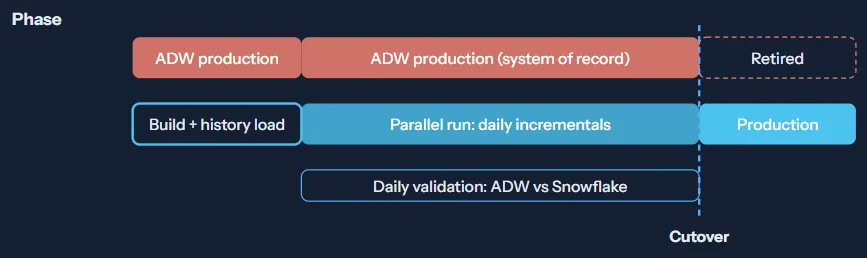
Step 11: Compare daily results with the validation tool
Every morning after the load plans finished, the validation tool compared ADW and Snowflake for each migrated table and produced a scorecard. Our exit criteria: an agreed number of consecutive clean days, including a month-end close where possible.
					-- Simplified daily reconciliation, results stored in a control table
INSERT INTO CTRL.DAILY_RECON (run_date, table_name, adw_cnt, sf_cnt, adw_sum, sf_sum, status)
SELECT CURRENT_DATE(), 'FACT_ORDERS',
       a.cnt, s.cnt, a.amt, s.amt,
       IFF(a.cnt = s.cnt AND a.amt = s.amt, 'PASS', 'FAIL')
FROM   (SELECT cnt, amt FROM CTRL.ADW_SNAPSHOT WHERE tbl='FACT_ORDERS' AND d=CURRENT_DATE()) a,
       (SELECT COUNT(*) cnt, SUM(AMOUNT) amt FROM SALES_DW.FACT_ORDERS
        WHERE ORDER_DATE >= CURRENT_DATE()-1) s;
What to track
- Row counts and key sums per table, per day.
- Row-level hash differences for critical facts.
- Load plan duration and failures on both platforms.
- Report-level checks: run the top business reports on both sides and compare outputs.
Step 12: Cut over to production with zero downtime
Because Snowflake already held current data and had been validated daily, cutover was a controlled switch, not a rebuild. We did it in this order:
- Confirm the last N days are all PASS and get sign-off from data owners.
- Run a final incremental on both platforms and validate.
- Repoint BI tools, APIs, and downstream jobs to Snowflake using connection aliases or DNS-style switches, not code changes.
- Disable the ADW-targeted ODI load plans; keep the Snowflake-targeted ones scheduled.
- Monitor closely for the first week. Keep ADW read-only as a rollback path.
- Retire ADW after the agreed retention period.
					-- Post-cutover health check on Snowflake
SELECT table_name, MAX(run_date) AS last_ok
FROM   CTRL.DAILY_RECON
WHERE  status = 'PASS'
GROUP  BY table_name
HAVING MAX(run_date) < CURRENT_DATE() - 1;   -- any rows returned need attention
Lessons learned
- Trace, don’t assume. The load plan showed what was really in use.
- Decide data type rules once. Empty strings, DATE vs TIMESTAMP, and bare NUMBER caused most of our mismatches.
- Validate twice. History proves the load; incrementals prove the logic.
- Use a watermark. It made the history-to-incremental handoff safe.
- Parallel run is cheap insurance. It turned cutover into a non-event.
Zero downtime was not a single trick. It was the result of validating early, validating daily, and only switching once the evidence was boring.
Want to see how we did it? Read Case Study: How Stridely Accelerated Snowflake Migration by 60%
Author Bio
Dwiref Shah is a Senior Technical Project Manager with 18 years of experience leading enterprise technology, data, and business intelligence initiatives. He specializes in data platform modernization, Snowflake, Power BI, and large-scale cloud migration programs, with a strong focus on transforming legacy data environments into scalable, modern analytics platforms