Many businesses begin their Salesforce journey with structured goals, detailed plans, and a clear idea of how the platform will support growth. Once the implementation is done, the day-to-day routines can slowly limit the way the system evolves. Over time, the setup may no longer align with the way your business operates today. Since Salesforce requires a serious budget, it becomes important to make sure the platform delivers meaningful value.
Salesforce keeps shifting with new features, better automation options, stronger analytics, and smarter tools. If your setup has not kept pace with these advancements, you might be losing value that is already available inside the platform. Updating the environment is not as simple as switching on a new feature. Every change needs to align with the way your teams work, the data you manage, and the goals you expect the system to achieve.
Before any adjustments, you need a clear view of how your current structure behaves. Many performance issues begin in old configurations, outdated automation, or workflows that were designed for a previous stage of the business.
Stridely’s Salesforce Optimization Services gives you a detailed look at these gaps. It shows where processes slow down, where data quality slips, and where the system can be restructured to match the capability Salesforce offers today.
Why Your Salesforce Environment May Be Outdated
Many businesses are surprised to learn that their Salesforce setup is already lagging, even if they have been using the platform for only a short period. The ecosystem moves fast, and new features keep reshaping the way teams build automation, manage data, and customize user experiences.
One major change has been the rise of Flow. The Flow tool has become the central way to manage automation in Salesforce. In older setups, many processes were built with Process Builder, which has now reached the end of its life. Flow runs faster, handles complex logic with far more stability, and is easier to maintain as your business grows. If your org still depends on older automation, daily tasks might feel slow or fragile without you noticing the exact reason.
There is also a change on the user interface side. Visualforce pages were once the standard method for custom screens. Today, most teams use Lightning components, which work closer to modern web applications and give users a smoother experience. If your org still runs on Visualforce, you may face higher maintenance efforts along with limitations that affect user productivity.
Outdated tools can quietly increase operational costs and reduce the value you get from Salesforce. Updating these parts of the system often gives immediate wins as well as long-term stability.
Learn More – Salesforce Sales Cloud – Features, Benefits, and Implementation Guide
Use Technical Health Check for Salesforce Optimization
A Technical Health Check can reshape the way your Salesforce setup performs. Think of an organization that has been using the platform for a decade. During that time, many automations were created with Process Builder along with several custom triggers. Everything functions on the surface, yet the system feels heavy and any small change becomes a slow process because of the mix of old logic sitting underneath.
A structured health check gives a full picture of this complexity. It highlights outdated Process Builder flows that should shift to Flow, finds triggers that overlap each other, and uncovers automations that teams no longer use but still influence performance. Once these areas are cleaned up and migrated to the right approach, the environment becomes easier to maintain. The team can focus on new goals instead of spending time fixing issues created by older components.
Identify and Reduce Technical Debt
Technical debt builds up when older tools and setups remain in place long after better options become available. The first step is understanding where these issues sit in your org. Every organization has its own pattern, yet a few signs show up again.
- Old automation tools – Many setups still run on Process Builder even though new versions can no longer be created. These should be reviewed and moved to Flow where possible.
- Redundant or slow code- Some businesses run several triggers on the same object, which creates extra load. The better practice is having one clear trigger per object for easier maintenance and more stable execution.
- Unused automation – Over the years, teams often build solutions that later become irrelevant. These items still run in the background and add weight to the system.
- Legacy user interface components – Visualforce pages served their purpose in the past, but Lightning components offer better performance with a more modern experience. Keeping older pages can limit what users can do on the platform.
Utilizing Salesforce Optimization Strategies
-
Strengthen Data Management
A strong Salesforce environment always begins with reliable data. Duplicate records, missing values, and outdated details can distort reporting and slow down daily work. A data-first approach helps prevent this. Teams define what information they need, when they collect it, and who maintains it. Balanced required fields, well-planned page layouts, and controlled inputs through validation rules or picklists all support cleaner data.
Quality also improves through regular audits. Tools such as Last Modified reports, Duplicate Management, and Einstein-based enrichment help detect gaps and keep data consistent. Governance processes bring structure by defining how information is handled, updated, and secured across the organization.
-
Use Automation to Improve Performance
Automation turns Salesforce into a more active system that supports sales, service, and marketing teams. Flow is now the primary automation tool and replaces older options like Process Builder. It manages lead routing, field updates, alerts, guided steps, and customer journeys without requiring code.
Other automation options, such as formulas, validation rules, quick actions, and Apex, provide extra depth when processes need advanced logic. When applied correctly, automation removes manual effort and helps teams move faster.
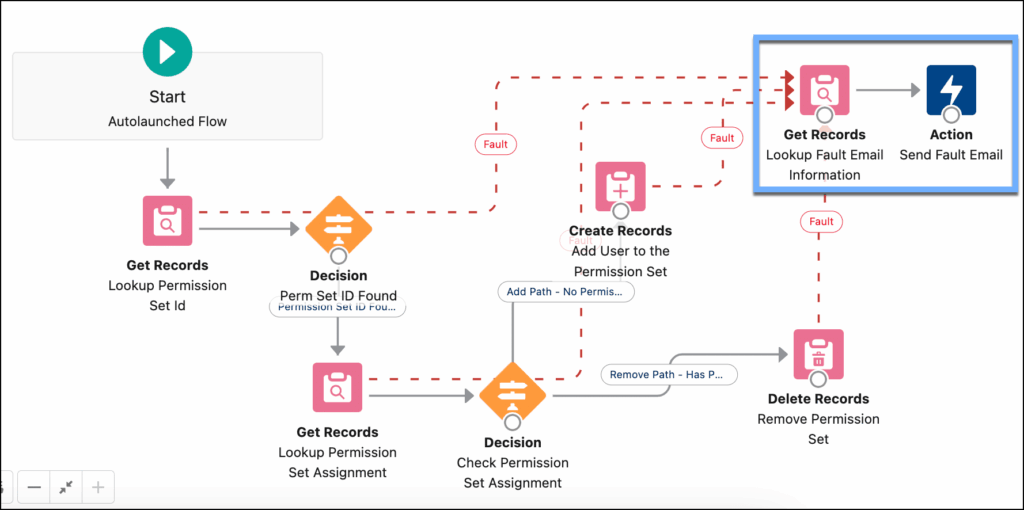
Source: Salesforce
-
Tailor the Platform with Configuration and Customization
Configuration makes it easier to adapt Salesforce to your daily operations. This includes branding, custom URLs, personalized homepages, renamed fields, custom objects, and well-designed dashboards or reports. These adjustments help users see the information they need with less friction.
For more advanced scenarios, customization through Apex, Lightning Components, or Visualforce supports complex logic, multi-step processes, scheduled tasks, and custom interfaces. These additions increase flexibility, though they also require ongoing maintenance during Salesforce releases.
-
Integrate Salesforce with Your Broader Technology Stack
Integration helps you bring data and processes together across systems. Customer details can move automatically into accounting or ERP tools, website leads can flow into Sales Cloud, and multi-system workflows can stay aligned without manual updates. This reduces errors and saves time.
Salesforce offers multiple integration pathways, ranging from no-code options like MuleSoft Composer and Flow to API based developer integrations. In some cases, you can even reference external data directly without storing it inside Salesforce.
Learn More – Salesforce Integration: Strategies, Architectures, and Best Practices Explained

Source – Salesforce
Optimize Your Environment with Salesforce Optimization Experts
Many businesses have an internal Salesforce team, yet a full technical review often stays pending because teams are already handling support tasks, enhancements, and daily requests. A complete evaluation of automation, data quality, code, security, and integration needs time and focus, and that can disrupt internal priorities.
Stridely’s consultants spend their time solving challenges across many Salesforce environments, so they recognize patterns fast. They know the typical places where technical debt collects and the kind of issues that slow down performance. This experience helps complete a health check in a smoother and more cost-efficient way while shaping your org for long-term stability.
A recent success story, where Stridely delivered for a manufacturing client that struggled with slow automation, duplicate data, and several custom triggers that kept failing during peak hours. The team performed a full review, cleaned old Process Builder flows, consolidated triggers, rebuilt key logic in Flow, and streamlined data validation. After the Salesforce optimization, the client reported faster record updates and a clear drop in maintenance effort.
Their internal team could finally focus on new initiatives instead of patching older components.
With Stridely handling the complex layers of technical debt and system clean-up, your team can shift attention to growth projects, new process improvements, and strategic work that moves the business ahead.
Ending Notes
Salesforce delivers its best results when the setup stays clean, efficient, and aligned with the way your business grows. A technical health check helps uncover hidden issues, strengthen data quality, and prepare the platform for new goals. Stridely brings the experience, structure, and technical depth that make this process faster and more dependable. With our support, your teams can focus on growth while the system stays ready for the next stage.
If you want to improve performance or plan your own Salesforce optimization journey, connect with Stridely, and our Salesforce team will guide you through the next steps.